Common formats in one player.
Tested formats include MP4, MOV, MKV, WebM, MP3, WAV and FLAC, plus images, PDFs and MIDI. Prism selects Apple playback or VLC for each file.
Open video, audio, images, PDFs, MIDI and interactive HTML in one player. Follow MIDI in Prism’s spectral piano scene or Staff view, and keep a score beside the recording you’re studying.
A practical setup
Keep a score beside its recording, then loop the passage you want to hear and study again.
Open a local recording in Prism and add the accompanying PDF.
View the score beside the recording and set a loop around the passage you want to study.
Adjust playback for the exercise, then return to the full recording when you are ready.
Before you begin
The public download is a free beta for Apple silicon on macOS 15 or later. Check the release notes for supported formats and online-link limitations.
Inside Prism 1.0.5
Follow the falling notes into a spectral piano, with pitch-class colors and musical readouts. Switch to Notes or Staff when you want to study the same performance in detail.
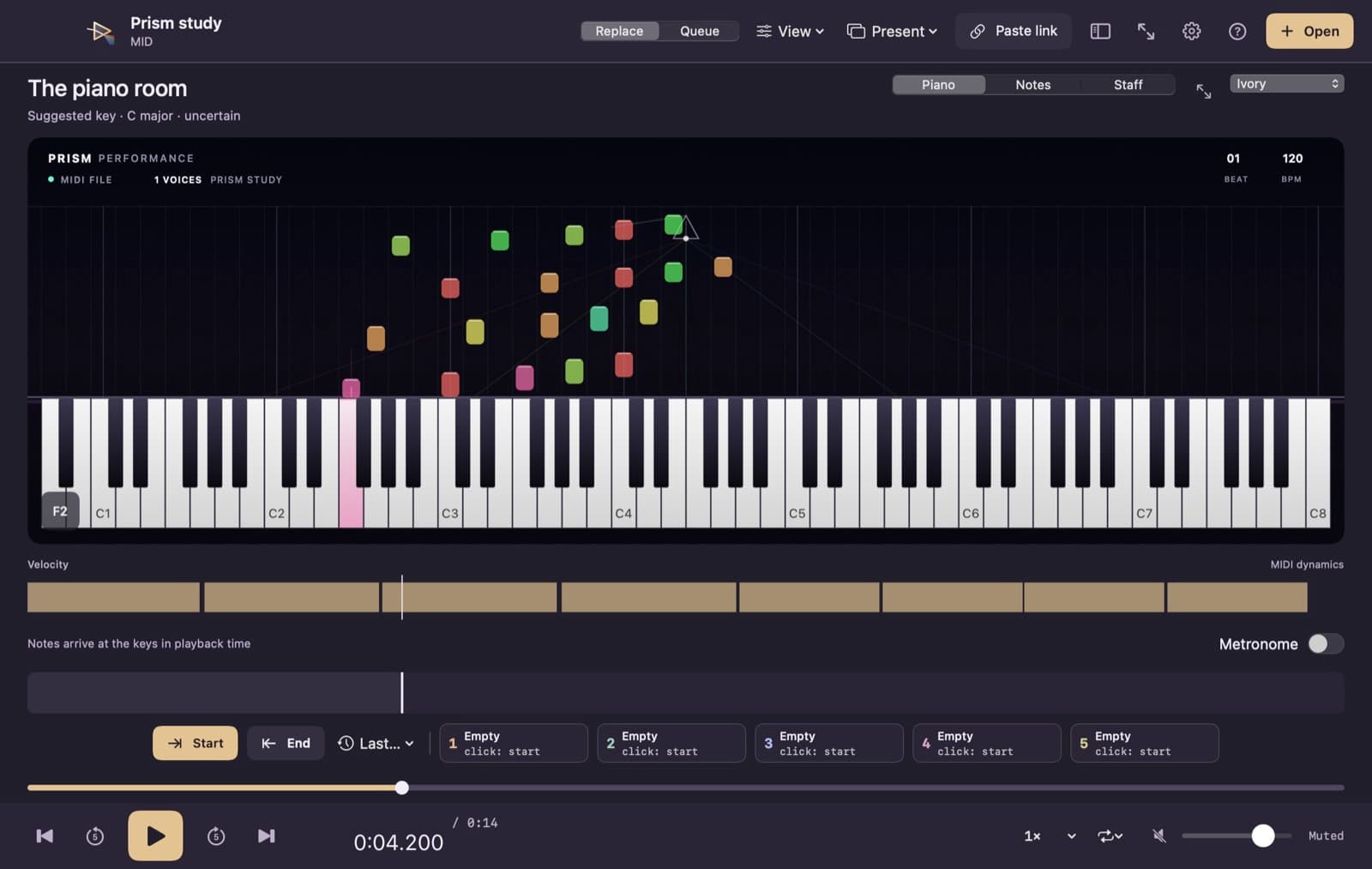
Recorded on our studio Mac
Mark the part you want to practise, then choose half speed. The passage repeats so you can focus on the detail instead of finding the same point again.
29-second silent capture · Prism 1.0.2 studio candidate. Recorded on 1 October 2026. This preview shows a studio candidate; see the download panel for the current public release. No camera or microphone was recorded.
Play supported video and audio, study MIDI and scores, open interactive HTML files, create practice loops, and prepare an OBS scene for teaching.
Tested formats include MP4, MOV, MKV, WebM, MP3, WAV and FLAC, plus images, PDFs and MIDI. Prism selects Apple playback or VLC for each file.
Open three PDFs side by side and loop a passage with the I/O keys. Create an OBS scene for Prism’s media view, then check your camera and audio sources in OBS.
Start with compact playback controls, hover video stills and a pinch-adjustable filmstrip. MIDI has a spectral piano scene with pitch-class colors, falling notes and arrival cues, plus a locally engraved Staff mode with adjustable quantization, key and meter. Musical readouts follow the MIDI file; notation settings do not alter playback. Export smaller video, audio, PDF or image copies; window preferences and history controls are per user.
Add YouTube and Instagram links to the queue. Native Instagram playback and YouTube playlist import require GrabIt; otherwise, playback follows each service’s embedded-player limits.
Open local HTML with its styles, images and JavaScript. Follow links, use forms and choose files, then save page-generated downloads to a location you select. Browser storage is temporary; local navigation stays within the opened document’s folder.
The current release is available for student and internal-team beta testing, verified on an Apple M4 Pro with macOS 15.6.1; broader device testing is still in progress. It needs an Apple-silicon Mac on macOS 15 or later. Instagram reels that need a login, and DRM-protected media, will not play. Instagram native playback and YouTube playlists need GrabIt installed. Copies without an updater need one initial download. Current builds check for signed updates and ask before installation or relaunch; automatic discovery can be switched off.
I teach from videos, scores and photos all day. I wanted one place to keep a recording beside its score and make the media easier to share in a lesson. — Jason Zac
macOS 15.0+ · Apple silicon
Apple silicon only. Older copies without an updater need one initial download. Later updates ask before installation and relaunch. No Intel build is currently available. Later macOS releases still need testing.
Release notes and early build calls for this product.
If your installed Prism has no Check for Updates command, install the current download once. It then checks a signed update feed; you choose when to install and relaunch. Automatic checks can be switched off, and you can check manually. Active playback must finish before replacement.
Email music@nathanielschool.com with your Mac model, macOS version, Prism version, file type, and the steps that caused the problem; include a screenshot if useful and share private media only when you choose to.
Prism is currently a free beta. If you buy a paid edition, one purchase includes lifetime use and all future updates to Prism, including future major versions. No subscription. The intended personal licence covers up to three Macs you use.
An Apple-silicon Mac running macOS 15 or later. Open the downloaded file, drag Prism into Applications and open it. It is signed and notarized by Apple. On first launch it offers to become your player for video, music, photos, PDFs and MIDI.
Only if you say so. The first-launch screen lets you choose which kinds of files open in Prism, and you can change that any time in Settings or with Finder's Open With.
Prism has no analytics and local media playback does not upload your files. Online media contacts the service you open. HTML pages can load remote resources, run JavaScript and submit forms; only choose files for a page you trust. HTML browser storage is temporary and pages receive no native Prism control bridge.
Choose Present, then Set up OBS to create a scene for Prism’s media view. Check framing, camera and audio sources in OBS for your own setup.
VLC and FFmpeg, among others. The list, licences and where to get the source code are at github.com/jasonzacmusic/labs-downloads/blob/main/prism/SOURCE-CODE.md
Save permitted video or audio, choose stills, clips and GIFs, and make practice copies with on-device transcripts in one Mac app.
See every drive's space, health and speed, find REAPER projects, duplicates and photos, and clear backup files to the Trash safely. Free for Mac.