Nathaniel Labs
Capture & Media

Capture a lesson. Keep the useful moment.

Paste a permitted YouTube or Instagram link. Save video or audio, choose a still, clip or GIF, then create a slower practice copy or an on-device transcript.

A practical setup

Save video or audio, choose stills and clips, and make practice copies with on-device transcripts in one Mac app.

Try one NSM lesson before class

  1. 01

    Install the notarized Mac app, choose your download folder and paste the NSM example from the student guide.

  2. 02

    Choose Best video with Stills enabled, wait for Done, then export one PNG, short clip or GIF from Smart Moments.

  3. 03

    Save audio for a slower practice copy, or add an on-device transcript after the optional speech-model download.

Before you begin

Free early access; paid checkout is closed. Follow the student guide at grabit.nathanielschool.com/getting-started.html. Source availability varies; check rights and review generated text. GrabIt is a Mac app.

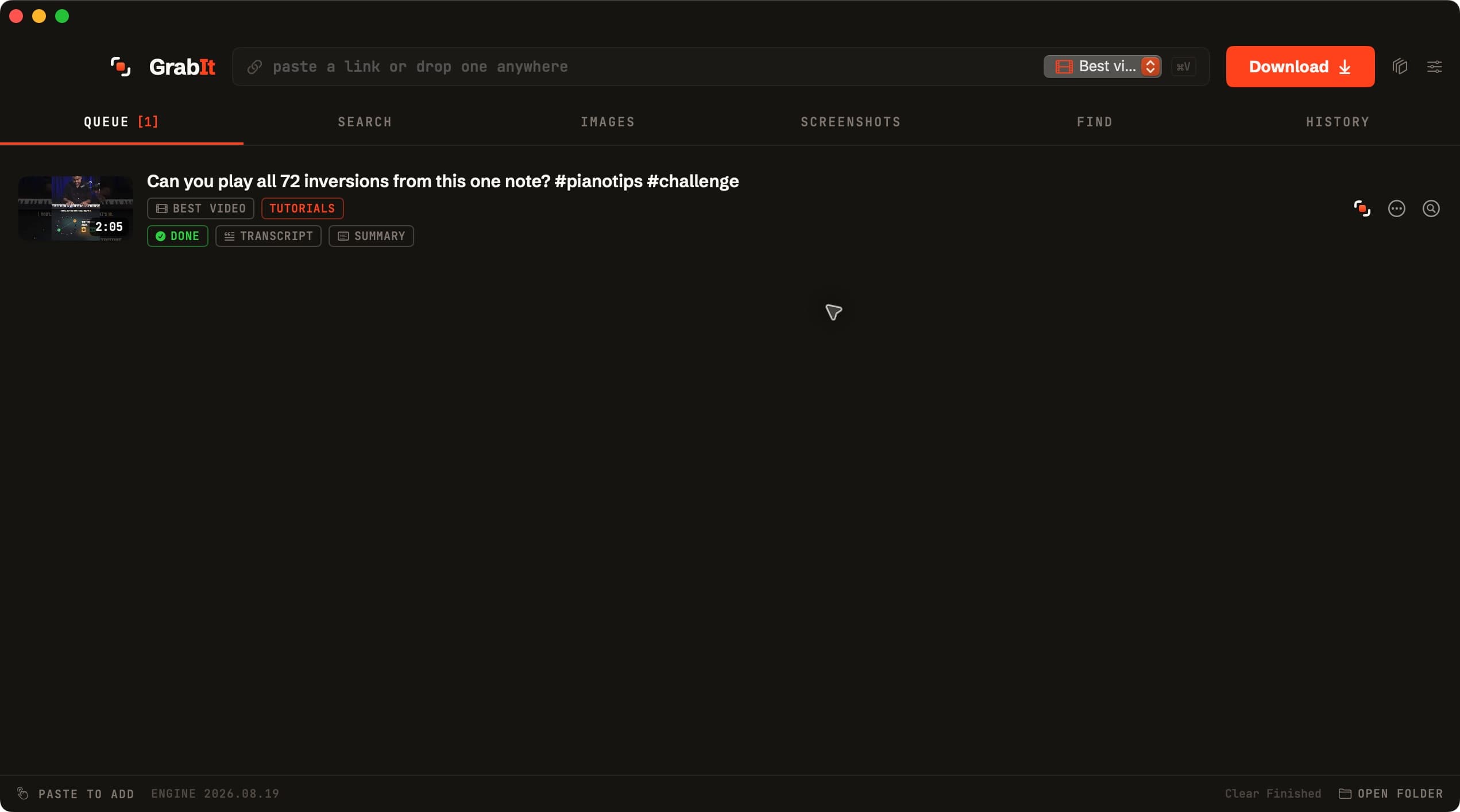
GrabIt showing a completed Nathaniel School of Music lesson download with transcript and summary files
Captured on our studio Mac with GrabIt 1.22.0: our own two-minute lesson saved with its transcript, captions and summary. Generated text can need correction. The iCloud Inbox is optional; the app can queue links without the iPhone hand-off.

What it does

Save permitted video or audio, choose stills, clips and GIFs, and make practice copies with on-device transcripts in one Mac app.

From a link to the part you need.

Save video with its available audio, silent video, MP3 or M4A. Choose a start/end range, paste a batch of links, and keep compatible MP4 enabled for broad playback support. Source availability and transfer speed vary.

Choose stills, clips and GIFs.

YouTube covers appear on paste. The Stills control opens Smart Moments after a video finishes; review suggested frames and export a PNG, short clip or GIF.

Make a practice copy.

Export slower or transposed audio while keeping the original. Create on-device Whisper text and SRT after the optional model download; check musical terms and names before reusing generated text.

A library you control.

Search approved image, video and PDF folders by name, text or detected labels. Saved analysis is reused; the Mac replays file changes made while GrabIt was closed. Existing folders reconcile once after this upgrade to establish their saved change cursors. Online Jev features are optional and off for new users; they can send names and short text excerpts after you enable them. Original media and local folder paths are not uploaded.

Find images and capture a reference.

Search Wikimedia and Openverse, review licence/attribution details, or capture a selected browser tab or screen area with the relevant macOS permission.

Preferences stay with you.

Keep history or switch it off. Remove saved history without deleting original files. Workspace and Settings placement stay local to each user; signed app updates ask before replacement and wait for active work.

Honest expectations

The current download is free early access with no email login, enforced trial or paid activation. The universal Mac package targets macOS 13 or later; runtime acceptance uses macOS 15.6.1. Windows, Linux, iPhone and Android applications are not shipped. Physical Intel/macOS 13, restricted sources and a clean second Mac remain team acceptance checks. The release includes a matching FFmpeg/x264/LAME source package and build recipe. Paid launch still needs provider eligibility and purchase-to-install acceptance.

Founder note

I make about fifty lesson videos a year. GrabIt is how my own reference material, my own back catalogue, and openly licensed media get into Final Cut without a browser full of sketchy converter sites.

What's new

  • When a newer GrabIt is ready, an "Update available" button appears at the top of the window. Click it to read what changed, then choose Install or Later.
  • GrabIt › Check for Updates… and Settings › Updates now show the version you have.
  • GrabIt still checks when it opens, when you come back after an hour, and hourly while open. It never installs or restarts by itself; downloads, captures and indexing finish first.

Downloads

macOS 14.0+ · Apple silicon and Intel

Universal Apple silicon/Intel package, verified in the studio on Apple silicon and through Rosetta. Physical Intel/macOS14 and a clean second Mac remain rollout checks. Grant browser or screen access only for the feature that needs it. Later macOS releases still need testing.

Known issues

  • GrabIt 1.23.1 build 41 targets macOS 13 or later, with durable incremental indexing and user-confirmed signed updates; a found update shows an Update available button in the main window. Studio runtime acceptance is on macOS 15.6.1; each installation requires an explicit choice.
  • Paid checkout and paid activation are closed. Paddle's published acceptable-use policy lists streaming downloaders among prohibited categories; product eligibility and the complete purchase, recovery and refund journey are not cleared.
  • The matching FFmpeg 9.0.2/x264/LAME source archives, pinned build recipe and provenance accompany this release. This does not provide matching source for older provider-built FFmpeg releases.
  • Windows 10/11 and Linux ports are unfinished; there are no installable packages for them. Physical Intel/macOS 13, clean second-Mac and restricted-source acceptance remain open team checks.

Follow GrabIt

Release notes and early build calls for this product.

FAQ

How do students get started?

Follow the [student guide](grabit.nathanielschool.com/getting-started.html): install the notarized DMG, choose a folder, download the NSM lesson example, then export one still or short practice copy before class. GrabIt currently runs on Mac.

What am I allowed to capture?

Content you own, have permission to save or can use under its licence. Downloading does not transfer rights or remove attribution duties. Review the source terms and acceptable-use policy.

Can I buy GrabIt today?

Paid checkout and paid activation are closed. The current download is free early access, not an enforced 30-day trial. The proposed individual price is $27 once; a download does not grant a future paid licence.

What would a future purchase include?

The intended personal purchase covers lifetime use and all future updates to GrabIt, including major versions, on up to three Macs you use. No subscription. Final purchase terms and working activation must be available before payment.

Which Macs have been tested?

The universal package targets Apple Silicon and Intel on macOS 13 Ventura or later. Studio runtime tests use macOS 15.6.1 and Intel execution through Rosetta. Physical Intel hardware, actual macOS 13 and a clean second Mac remain team acceptance checks. Macs unable to run Ventura and Windows/Linux devices are not supported by this installer.

What stays on my Mac?

Transcription, media rendering, scene selection and the local index run on your Mac. Optional Jev sends titles, descriptions, names, labels and short excerpts after you enable it; full media files and local folder paths are not uploaded. Downloads, search, models and updates use the network.

Is there an iPhone app?

GrabIt is a Mac app. An optional Share-to-Mac Shortcut passes links through an iCloud inbox after setup; it needs GrabIt running on the Mac and is off for new users until enabled. There is no standalone GrabIt iPhone app.

Does it update itself?

GrabIt checks for signed updates on opening, on returning after an hour and hourly while running, when automatic checks are enabled. You choose Update before installation or relaunch; downloads, helper processes, captures, indexing and export sheets defer replacement. Closed or offline devices do not receive an instantaneous update. You can also download the same current installer here.

Related tools

Prism

Capture & Media
Live

Play supported video and audio, study MIDI and scores, open interactive HTML files, create practice loops, and prepare an OBS scene for teaching.

Kosh

Capture & Media
Live

See every drive's space, health and speed, find REAPER projects, duplicates and photos, and clear backup files to the Trash safely. Free for Mac.